pwn-to-own
Tips and tricks for pwnagotchi (pi0w, pi02w, and Jayofelony’s build)

These files are for educational, research, and personal experimentation only. Use them responsibly with your own devices. I am not liable for any unethical or harmful use.
I reccomend looking at this Idea List if you are interested in purchasing the hardware required for this project
-
If you do not have experience soldering stuff, get the Pi Zero WH or Pi Zero 2WH (W = WiFi, H = Headers pre-soldered). Alternatively, you can go for a Pi 4 or Pi 5 (but those are less popular in the pwnagotchi community)
-
If you are buying a waveshare e-ink display, go with v3 or v4 and make sure to only get the two-color version (do not get the one with red ink as well, it causes issues down the line). You will need to connect the screen via the GPIO pin headers on the Pi
- Your pwnagotchi will not fit in the official case when you have the screen attached… you will need to 3d print or buy a case that fits.
Code snippets are here
How to use an external usb wifi dongle here
Have fun with stats here
3D Printed Case
Case I use with the WaveShare 2.13” eIink HAT (v4) with my Pi Zero 2WH
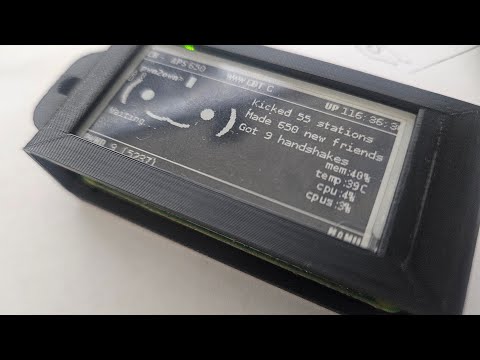
STL Files for the case are available on:
Plase download, like, post your make of the design and provide feedback if you like it!
Plugins
Here are some plugins that I developed myself and recommend
Directories
in the config file, set:
main.custom_plugins = "/usr/local/share/pwnagotchi/custom-plugins/"

/etc/pwnagotchi/custom_plugins  # your custom plugins are here by default, whether they are enabled or not
in the config file, you can add or remove repositories that have plugins installed by modifying this array:
main.custom_plugin_repos = [   "https://github.com/evilsocket/pwnagotchi-plugins-contrib/archive/master.zip",

]
make sure that each element in the array ends with /archive/master.zip (or /archive/main.zip) or something similar, otherwise the plugin may not be loaded properly
You can make your own repo with plugins, or just copy a plugin you like directly to this directory /etc/pwnagotchi/custom_plugins/ just as well (and then enable it)
/usr/local/share/pwnagotchi/available-plugins # plugins that are available to be installed - if you used a repo and did update… those plugins would appear here
You can also try out PWNSTORE which is a slick way to find new plugins that have been tested out!
Bluetooth pairing
For newer builds (2.9.5.3 and up)
In 2.9.5.4 and on, BT-TETHER-HELPER is installed by default and works great!
In older versions of Pwnagotchi (such as 2.9.5.3), you will need to migrate over (and overwrite the old bt-tether plugin). Follow this guide and it isn’t too complex.
The plugin only supports 1 device at a time. Newer versions of Android (depending on OEM, it can be from v15 or v16 and on) enable IP randomization by default… this means that you can still pair to your pwnagotchi via phone, but you won’t know the client IP address unless you have a plugin that shows IP on screen or use bt-tether-discord (and set up a webhook) or bt-tether-telegram (and set up your own bot - a bit more complex).
For older builds of the pwnagotchi only (2.8.9 etc)
The 4th section of this guide is perfect and still works besides for paired-devices on my Pi zero 2w.
via SSH:
ssh pi@10.0.0.2
sudo su
bluetoothctl
scan on
discoverable on
untrust *device adress*  #run this command a few times
remove *device adress*   #run this command a few times
paired-devices #make sure list is empty, if not- run previous command until it is empty
pair *device adress* #*In short time (maybe not immediately) you will be prompted on the phone to allow connection from your pwnagotchi hostname- pair*
trust *device adress*

# optional to run
connect *device address*
exit
On android, you need to enable Blueooth Tethering on top of bluetooth you would normally. This is found in the Mobile Hotspot and Tethering settings page.
Android also prefers IP addresses in the 192.168.44.x range.
Pairing multiple devices (of same or different types) is also feasible. It turns out that the bt-tether plugin doesn’t even check/verify what ‘android-phone’ or ‘ios-phone’ is… Meaning, any arbitrary text can replace that in your config!
For example:
main.plugins.bt-tether.devices.blah.enabled = true
is valid, but certainly less descriptive. Of course, the ‘blah’ keyword wouldneed to remain consistent across of all the bt-tether settings applied to that device.
Handshake Cracking Websites
I recommend using these two sites for distributed handshake cracking, both have pwnagotchi plugins that integrate well with them. Make an account and keep the API key they give you secret… you will use that key in the pwnagotchi config.toml file to connect to your respective account at: